

The AI Assistant App can be utilized to create professional sounding content for your website, correct errors, and seamlessly insert business information.
To activate the AI Assistant, just hover over any text on the web page and click the AI Assistant icon located in the right-hand options.
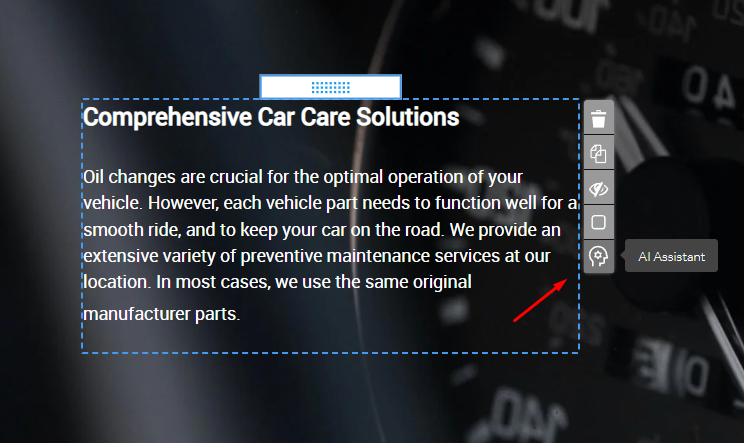
The application will open in a separate window. Each paragraph can be individually customized to fit your business requirements via the "Improve", "Personalize", and "Spell check" buttons. By default, all paragraphs are unselected (not highlighted in blue), except for the content that has already been processed by the AI Assistant.
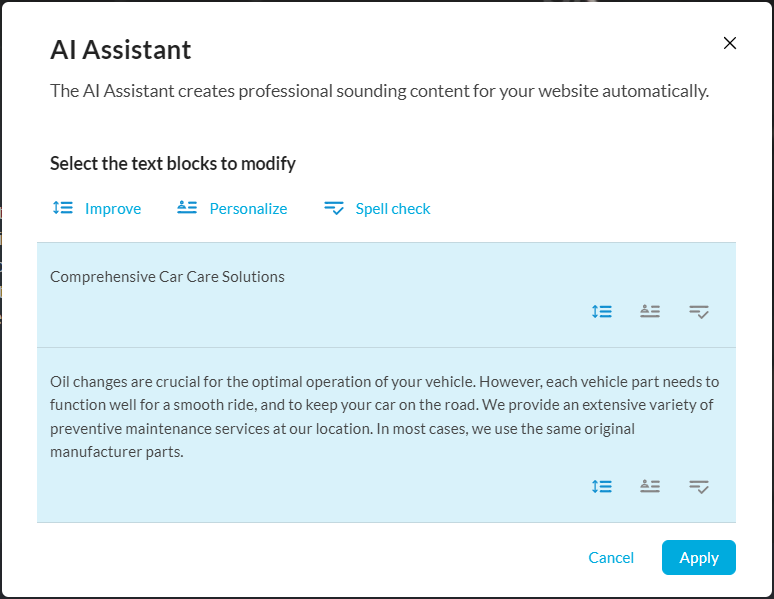
Available Options:
Improve
Implements modifications to the paragraph derived from the original text for a more professional tone.
Personalize
Incorporates pertinent business details like address and contact information where applicable.
Spell check
Revises potential spelling or grammatical inaccuracies.
Once finished, implement the modifications using the "Apply" button, located at the bottom-right corner of the window.
Note: Currently, the AI Assistant app only supports Text elements. Enhancement of Galleries and similar applications isn't available.